
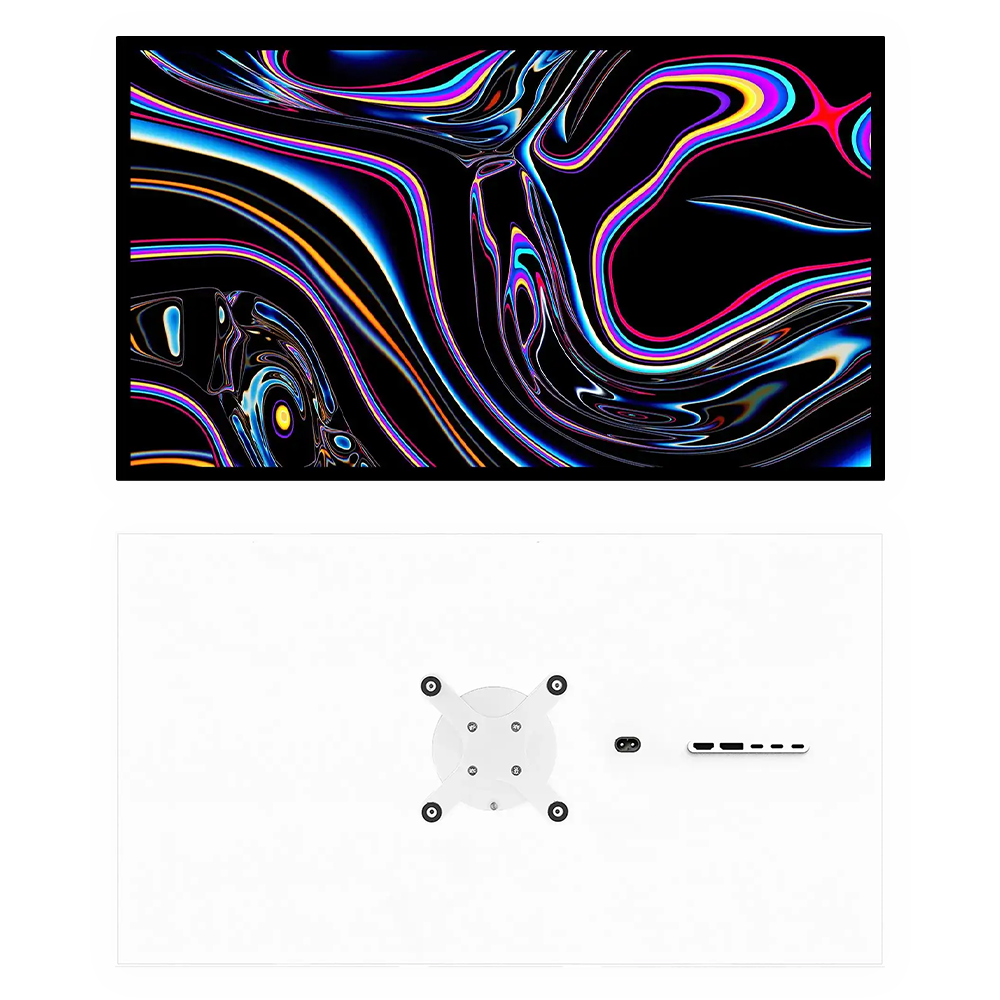
Kuycon G27P 27-inch 5K monitor for Mac
The sharpness of 5K. The contrast of IPS Black.
From $HK8,589.90 Energy efficiency class F, on a scale from A to G: see the energy label and the product information sheet
Plain back, monitor only, with VESA adapter.

- 5120 × 2880 5K resolution, 14.7 million pixels
- 218 ppi On a 27-inch diagonal
- 2000:1 IPS Black panel contrast, 600 nits
- USB-C 100 W Video, data and charging over one cable
At a glance
The Kuycon G27P, in 30 seconds.
The Kuycon G27P is a 27-inch 5K monitor (5120 × 2880, 218 ppi) at 75 Hz, with a 600-nit IPS Black panel and a 2000:1 contrast ratio. It displays over a billion colors (10-bit, 99% of DCI-P3). A single USB-C cable carries video, data and up to 100 W of charging. Aluminum chassis, glass front, plain or perforated back: for Apple Silicon Macs, PCs and consoles.
- Resolution
- 5120 × 2880 pixels (5K), 14.7 million pixels, 218 ppi, 16:9 aspect ratio
- Refresh rate
- 75 Hz in 5K, over USB-C, DisplayPort and HDMI, depending on the computer
- Panel
- IPS Black, bonded anti-reflective glossy glass, 600 nits full screen, 2000:1 contrast, HDR10
- Color
- 10-bit, 99% DCI-P3, 99% sRGB, 98% Adobe RGB, ΔE < 2
- Connectivity
- USB-C (video, data and 100 W charging), DisplayPort 1.4, 2 × HDMI 2.1, 2 × USB-C, 3.5 mm jack
- Compatible Macs
- 5K 75 Hz on Macs with M4 and later and on M2 and M3 Pro, Max and Ultra; 5K 60 Hz on other Apple Silicon Macs (details by chip)
- Back
- Plain, or perforated with a honeycomb pattern, your choice at purchase
- Size and weight
- 618 × 360 × 22 mm, 5.2 kg without stand, VESA 100 × 100 with included adapter
- Warranty
- 2 years worldwide, 14-day returns
- Price
- From $HK8,589.90, plain back, monitor only with VESA adapter
The Kuycon G27P from every angle.

Perforated back: a honeycomb pattern in the aluminum. 
Plain back: solid aluminum. 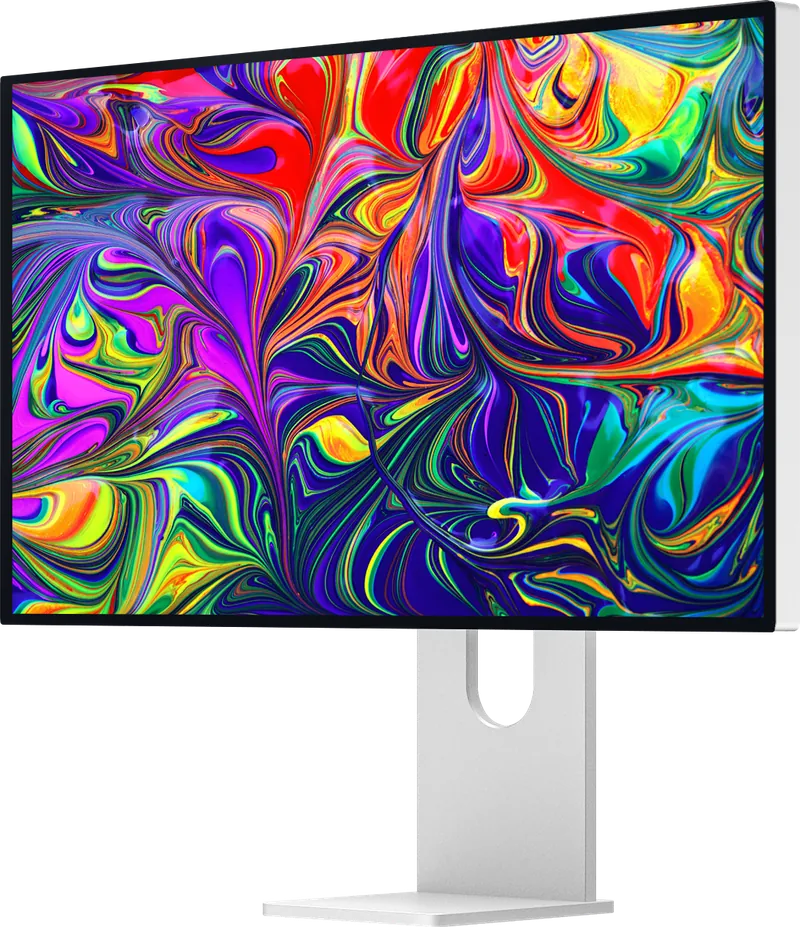
Three-quarter view: glass bonded from edge to edge. 
From the back, perforated version. 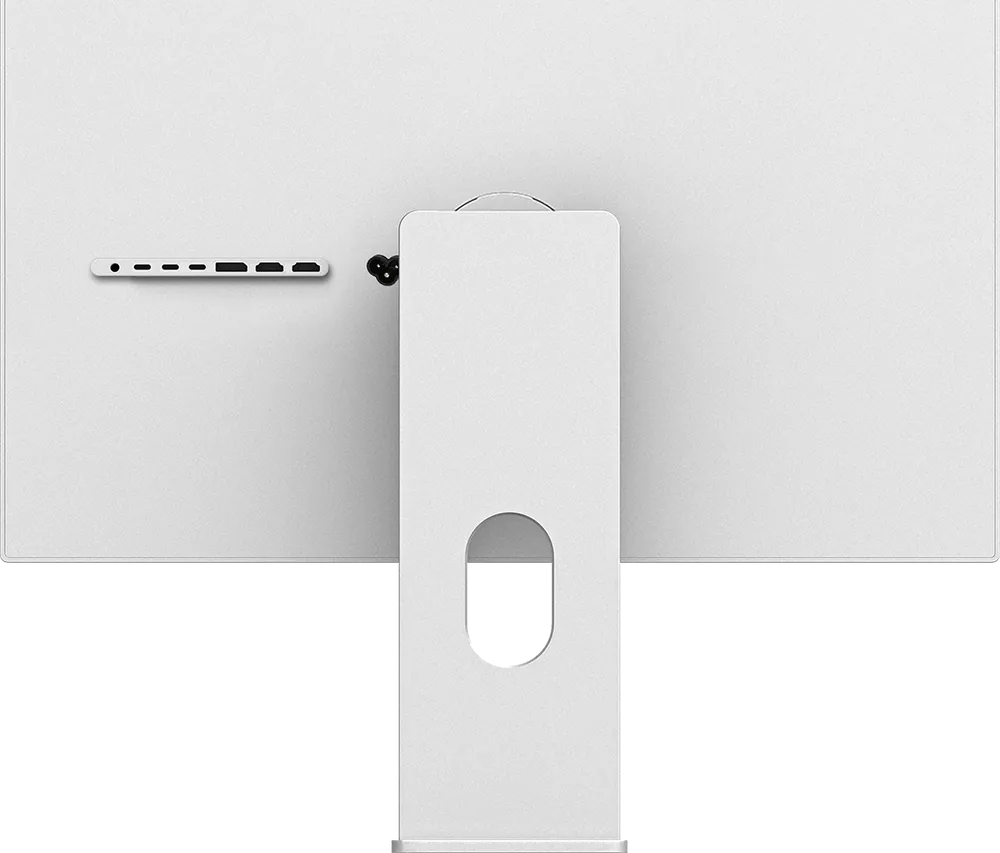
From the back, plain version. 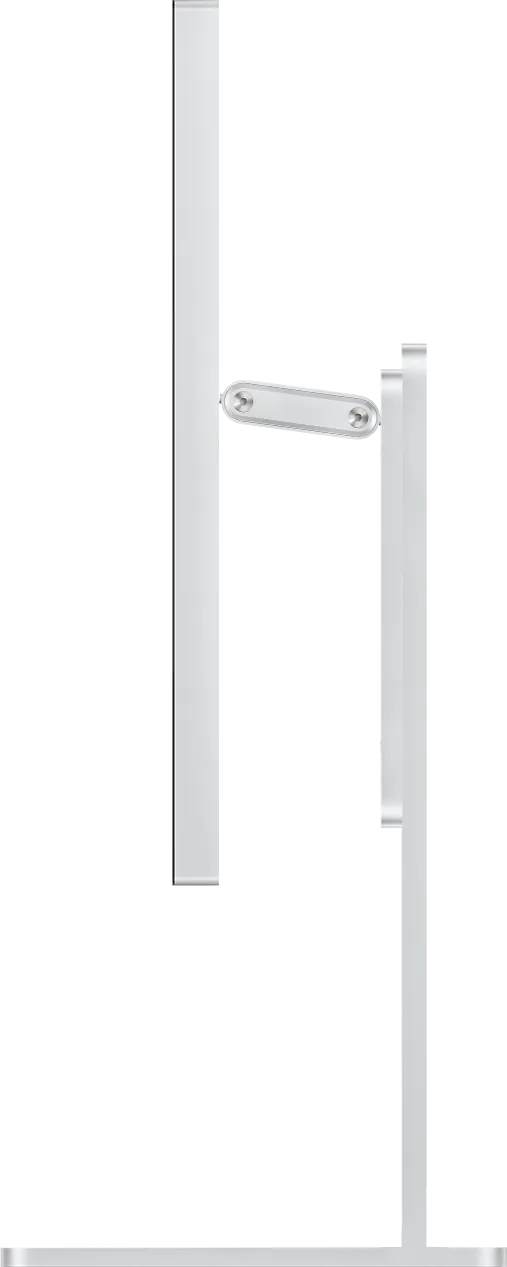
In profile: 22 mm thick. 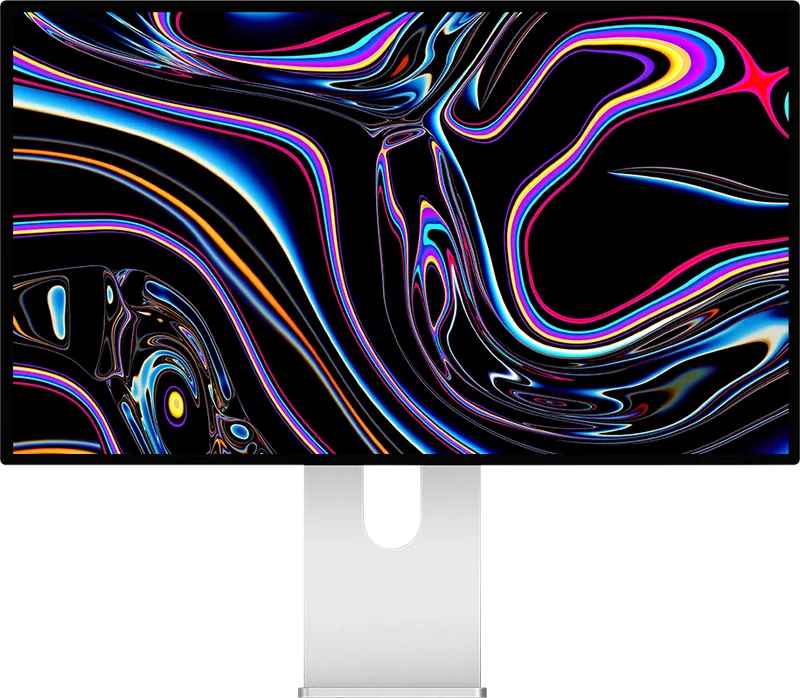
From the front: thin, even bezels on all four sides.


5K
27-inch 5K. 218 pixels per inch.
The Kuycon G27P displays 5120 × 2880 pixels on 27 inches, or 218 pixels per inch, the ideal density for macOS. In HiDPI rendering, macOS draws each point with four pixels: a 2560 × 1440-point workspace, with exceptionally sharp text.
It has 14.7 million pixels, 78% more than a 4K monitor. Its 75 Hz refresh rate makes scrolling and moving windows a little smoother than at 60 Hz.
5K 5120 × 2880 · 75 Hz
4K 3840 × 2160
- 218 ppi the ideal density for macOS
- 14.7 M pixels, versus 8.3 million in 4K
- 75 Hz in 5K, versus 60 Hz for most 5K monitors
The refresh rate you get depends on the computer and the port. On a Mac, see the table by chip. On a PC, 5K at 75 Hz runs over DisplayPort 1.4 with DSC, HDMI 2.1 or USB-C, with a compatible graphics card.
IPS Black panel
A 2000:1 contrast ratio. 600 nits across the entire screen.
The G27P's IPS Black panel reaches a 2000:1 contrast ratio, about twice that of a standard IPS panel. Blacks are deeper, shadows keep their detail, and the viewing angle stays wide. Brightness holds at 600 nits across the entire surface of the screen.
- 2000:1 Contrast
- 600 nits Full screen
- HDR10 Over USB-C, DisplayPort and HDMI
Good to know: no local dimming and no Mini-LED backlight. For reference-grade HDR, a Mini-LED display goes further; the G27P is built for everyday sharpness and contrast. Like any glossy screen, it reflects a window placed opposite it: it works best in a room without strong direct light.

Color
Over a billion colors. 99% of DCI-P3.
The G27P displays 10-bit color, or 1.07 billion shades. It covers 99% of DCI-P3, the digital cinema gamut with the same primaries as the Display P3 of Macs, 99% of sRGB, the web standard, and 98% of Adobe RGB, used in print, with a color difference ΔE below 2.
- 10-bit 1.07 billion colors
- 99% DCI-P3 and sRGB
- 98% Adobe RGB
sRGB, Adobe RGB and DCI-P3 modes limit the gamut to the chosen working space, and a paper-like black and white mode makes reading easier on the eyes. Tip: the first time you connect it, choose the monitor's color profile in System Settings, or adjust it with a colorimeter or an app like BetterDisplay.

Connectivity
5K USB-C 100 W monitor. One cable for video, data and charging.
On the G27P's USB-C port, a single cable carries the 5K picture, charges the MacBook at up to 100 W and connects the monitor's two USB-C ports. For a PC or a console: one DisplayPort 1.4 and two HDMI 2.1.

USB-C upstream
DisplayPort Alt Mode up to 5K HDR, USB data and USB Power Delivery charging up to 100 W. Compatible with Thunderbolt 3, 4 and USB4.
DisplayPort 1.4
HBR3 (32.4 Gbps), with DSC. 5K with a PC graphics card.
2 × HDMI 2.1
With FRL and DSC, up to 5K in 10-bit. A PS5 or an Xbox Series X|S in 4K HDR.
2 × USB-C downstream
USB 2.0 (480 Mbps): keyboard, mouse, USB flash drive.
3.5 mm jack
Audio output for headphones or speakers.
Built-in power supply
A single power cord, no external power brick. EU, UK, US, AU or CN plug, your choice.
The monitor's USB-C port connects to the Thunderbolt 3, 4 or 5 and USB4 ports of Macs and PCs. For 5K, use the included cable or a USB 3.2 Gen 2 or USB4 cable; for 100 W charging, a 5 A USB-C cable with an e-marker chip. On a PC, 5K at 75 Hz requires a DisplayPort 1.4 output with DSC or HDMI 2.1: NVIDIA GeForce GTX 1650, RTX 20 series and newer, AMD Radeon RX 5500 and newer, Intel Iris Xe. Without DSC, 5K is still possible at 60 Hz.
Mac compatibility
Which Macs run the G27P in 5K? All Macs with an M chip. The refresh rate depends on the chip.
Every Apple Silicon Mac, from the M1 chip to the M5 chip, displays the G27P in 5K over a single USB-C cable, with 100 W charging. It runs at 75 Hz on Macs with M4 and later, as it does on M2 Pro, M2 Max, M2 Ultra, M3 Pro, M3 Max and M3 Ultra; it stays at 60 Hz on M1 (all versions), M2 and M3.
| Chip | 5K refresh rate |
|---|---|
| M4, M4 Pro, M4 Max and later including M5 and M5 Ultra | 5K 75 Hz a single USB-C cable |
| M5 Pro, M5 Max* | 5K 75 Hz* |
| M2 Pro, M2 Max, M2 Ultra, M3 Pro, M3 Max, M3 Ultra | 5K 75 Hz a single USB-C cable |
| M3 | 5K 60 Hz |
| M2 | 5K 60 Hz |
| M1, M1 Pro, M1 Max, M1 Ultra | 5K 60 Hz |
| iPad Pro | 5K 60 Hz USB-C, iPadOS limit |
| MacBook Neo A18 Pro chip | 4K 60 Hz max no 5K |
Maximum refresh rate of the G27P in 5K by chip, with a single external display connected. Apple guarantees a 5K display up to 120 Hz from M4 chips onward, and 60 Hz before.
- * MacBook Pro with M5 Pro and M5 Max. Since March 2026, users of displays from several brands have reported a macOS bug: over USB-C or Thunderbolt, displays set above 60 Hz can drop back to 60 Hz. Apple has not released any fix to date; macOS 27 Golden Gate should normally fix it. In the meantime, the Mac's HDMI port, with an Ultra High Speed HDMI cable, works around the problem. The base M5, MacBook Air and Mac mini with M4 are not affected. The bug and its workarounds
- Intel Macs. 5K at 60 Hz over Thunderbolt 3 on 2017 and later MacBook Pro models with AMD graphics, 2017 and later iMac models, the 2019 Mac Pro and 2019 and later Macs with a 10th-generation Intel Core processor. Other Intel Macs are limited to 4K at 60 Hz.
Design
Aluminum and glass. A plain back, or perforated.
The G27P's chassis is machined from aluminum, sandblasted and then anodized; the front is a single sheet of glass bonded to the panel. You choose the back when you buy: plain, in solid aluminum, or perforated, with a honeycomb pattern. The choice of back changes nothing else: same panel, same ports, same refresh rate.
- CNC-machined aluminum, sandblasted and anodized
- Anti-reflective glossy glass, bonded across the entire surface
- 22 mm thick, thin, even bezels on all four sides
- Plain back in solid aluminum, or perforated back with a honeycomb pattern


Drag to switch from the plain back, in solid aluminum, to the perforated back, with a honeycomb pattern.
Dimensions

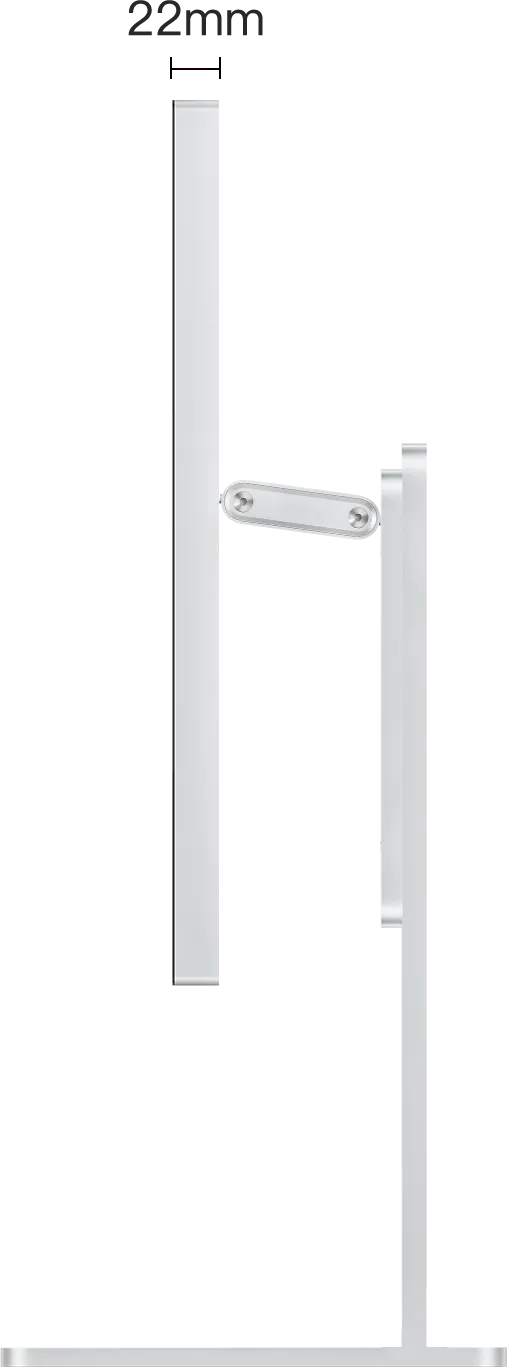
- Width
- 618 mm
- Height without stand
- 360 mm
- Thickness
- 22 mm
- Weight (monitor only)
- 5.2 kg
- Mounting
- VESA 100 × 100 mm
Mounting
On a stand, an arm or a wall. Even in portrait.
The G27P comes with a 100 × 100 VESA adapter for a monitor arm or a wall mount. The Kuycon 27-inch stand, fixed or height-adjustable, can be added as an option at purchase.
- 100 × 100 VESA adapterIncluded
Monitor arm or wall mount. Always included, even with a stand.
- Fixed standOptional
Fixed-height stand.
- Height-adjustable standOptional
Height adjustment, tilt, swivel and rotation to portrait mode.

Control from your computer
Adjust brightness from your keyboard.
The G27P supports the DDC/CI protocol: you can adjust brightness from your computer, with the keyboard keys or the menu bar, without using the remote.
- MonitorControl macOS
- BetterDisplay macOS
- Twinkle Tray Windows
- ddcutil Linux
The monitor has no control buttons: its menu opens with the included infrared remote. Batteries not included: 1 CR2025 battery for the white remote, 2 LR03 (AAA) batteries for the black one.
Comparison
An alternative to the Studio Display? The G27P versus Apple and the P27Z, by the numbers.
The Kuycon G27P has the same resolution as Apple's Studio Display, 5120 × 2880 on 27 inches (218 ppi), goes up to 75 Hz instead of 60 Hz and costs much less. Apple keeps the edge on the camera and the sound; the Kuycon P27Z goes further on refresh rate, up to 180 Hz.
| Kuycon G27P | Apple Studio Display | Kuycon P27Z | |
|---|---|---|---|
| Size | 27 inches | 27 inches | 27 inches |
| Resolution | 5120 × 2880 | 5120 × 2880 | 5120 × 2880 |
| Density | 218 ppi | 218 ppi | 218 ppi |
| Refresh rate | 75 Hz | 60 Hz | Up to 180 Hz in 5K, 330 Hz at 2560 × 1440 |
| Panel | IPS Black | IPS | Fast IPS |
| SDR brightness | 600 nits | 600 nits | 600 nits |
| Contrast | 2000:1 | Not published | 1500:1 |
| HDR | HDR10 | Not stated | HDR600, HDR10 |
| Color | 10-bit, 99% DCI-P3, 99% sRGB | 1 billion colors, P3 | 10-bit (8-bit + FRC), 98% DCI-P3 |
| Surface | Anti-reflective glossy glass | Glossy glass, optional nano-texture | Anti-reflective glossy glass |
| Connectivity | USB-C 100 W, DisplayPort 1.4, 2 × HDMI 2.1, 2 × USB-C, audio jack | 2 × Thunderbolt 5 (96 W), 2 × USB-C | USB-C 100 W, DisplayPort 2.1, 2 × HDMI 2.1, 2 × USB-C, audio jack |
| Speakers | No | Six speakers | Stereo (perforated back only) |
| Built-in camera | No | 12 MP | No |
| Weight without stand | 5.2 kg | 5.40 kg | 5.2 kg |
| Stand | Optional, VESA included | Stand or VESA kit, your choice | Optional, VESA included |
| Price | $HK8,589.90 plain back, monitor only, excluding shipping and import fees (no taxes charged) | from €1,699 Apple France price, tax-inclusivebefore sales tax | $HK9,779.90 plain back, monitor only |
Where the G27P goes further
- 75 Hz in 5K, while the Studio Display stays at 60 Hz
- A 2000:1 contrast ratio thanks to the IPS Black panel
- DisplayPort 1.4 and two HDMI 2.1 for a PC or a console
- Rotation to portrait mode with the adjustable stand, VESA adapter always included
Where the others keep the edge
- The 12 MP camera and six speakers of the Studio Display
- The nano-texture glass option to cut reflections, from Apple
- The Studio Display's Thunderbolt 5
- Up to 180 Hz in 5K on the Kuycon P27Z, for gaming and motion
Sources: Studio Display tech specs (apple.com/fr), checked on October 22, 2026. Apple prices: public prices checked on October 21, 2026 on the Apple website of the country shown, with local taxes, except in the United States and Canada, where Apple lists its prices before sales tax. Kuycon G27P and P27Z: user manuals and product pages. Kuycon does not charge any taxes: shipping is added; with DDP, import fees are paid in advance along with it; with DAP, VAT and duties are paid on delivery.
G27P reviews.
Customer reviews
Rated 5/5 · 2 reviews of the G27P
-
★★★★★
"I was skeptical at first, I didn't know the brand. In the end I'm blown away by the quality of the monitor. I do a lot of graphic design and I'm very particular about colour accuracy. Truly a lovely surprise."
Maelle V. ·
Original review in English
-
★★★★★
"I'm super satisfied with the quality of the monitor. You could easily mistake it for an Apple display."
Adel B. ·
Original review in English
Learn more.
- ComparisonApple Studio Display or Kuycon G27PThe full table, with the strengths and limits of both displays.Read the comparison
- Buying guideBest 5K monitor for MacWhat really matters in 5K, and which model to choose for your use.Read the guide
- Macs with M5 Pro and M5 MaxMonitor stuck at 60 Hz?The macOS bug, the affected Macs and the workarounds.Read the article
- QuizWhich monitor for my Mac?A few questions to find the right model and the right cable.Take the quiz
Compare all Kuycon monitors · In 5K up to 180 Hz: P27Z · In 6K, 32 inches: G32P

Kuycon G27P
27 inches · 5K · 75 Hz · IPS Black · aluminum and glass
From $HK8,589.90
- 2-year warranty worldwideWhatever the delivery country. Warranty details
- No taxes chargedDDP (import fees paid in advance) or DAP (taxes paid on delivery), depending on your country. Taxes and customs
- Express from our EU warehouse48 to 96 h to EU countries, subject to stock availability; otherwise from the factory. Delivery times
- 14 days to change your mindReturn it complete, in its original packaging. Returns
Sold by Reboot Global Corporation Limited, an authorized Kuycon reseller.
Kuycon G27P technical specifications
Display
| Size | 27 inches, 16:9 aspect ratio |
|---|---|
| Resolution | 5120 × 2880 pixels (5K), 14.7 million pixels |
| Pixel density | 218 ppi (218 pixels per inch), HiDPI rendering on macOS |
| Panel type | IPS Black, LED backlight |
| Refresh rate | 75 Hz in 5K, over USB-C, DisplayPort and HDMI, depending on the computer |
| Response time | 8 ms (GtG), 4-level overdrive |
| Variable refresh rate | VRR: AMD FreeSync, G-Sync compatible |
| Brightness | 600 cd/m² (nits), full screen |
| Contrast | 2000:1 |
| HDR | HDR10 (High Dynamic Range) over HDMI, DisplayPort and USB-C, enabled automatically, can be turned off; no local dimming |
| Surface | Anti-reflective glossy glass, bonded across the entire surface |
| Eye comfort | Blue light reduction, paper-like black and white mode |
Color
| Color depth | 10-bit, 1.07 billion colors |
|---|---|
| Gamut | 99 % DCI-P3, 99 % sRGB, 98 % Adobe RGB |
| Accuracy | ΔE < 2 |
| Modes | sRGB, Adobe RGB, DCI-P3 |
Connectivity
| USB-C upstream | DisplayPort Alt Mode, 5K HDR, USB data, USB Power Delivery charging up to 100 W (5 A cable with e-marker chip); compatible with Thunderbolt 3, 4 and USB4 |
|---|---|
| DisplayPort | 1 × DisplayPort 1.4 (HBR3, 32.4 Gbps), DSC, HDCP 2.3 |
| HDMI | 2 × HDMI 2.1 (FRL), DSC, HDCP 2.3 |
| USB-C downstream | 2 × USB-C, USB 2.0 (480 Mbps), 5 V 2.1 A |
| Audio | 3.5 mm headphone jack; no speakers |
| Controls | DDC/CI, infrared remote included, on-screen menu |
Compatibility
| Apple Silicon Mac (M-series chip) | 5K 75 Hz on Macs with M4 and later and on M2 Pro, M2 Max, M2 Ultra, M3 Pro, M3 Max and M3 Ultra; 5K 60 Hz on M1 (all versions), M2 and M3. Details by chip |
|---|---|
| MacBook Pro with M5 Pro and M5 Max | macOS bug: may drop to 60 Hz over USB-C when set above 60 Hz; the Mac's HDMI port works around it. Details |
| iPad Pro | 5K 60 Hz (iPadOS limit) |
| MacBook Neo | One external display up to 4K 60 Hz (Apple) |
| Intel Mac | 5K 60 Hz: 2017 and later MacBook Pro with AMD graphics, 2017 and later iMac, 2019 Mac Pro, 2019 and later Macs with a 10th-generation Intel Core processor; other Intel Macs: 4K 60 Hz max |
| PC | 5K 75 Hz over DisplayPort 1.4 with DSC, over HDMI 2.1 or over USB-C (Thunderbolt 3, 4, USB4); without DSC, 5K 60 Hz in 8-bit |
| PC graphics cards | NVIDIA GeForce GTX 1650 to RTX 2080 Ti, RTX 30 and RTX 40; AMD Radeon RX 5500 to RX 5600 XT, RX 6400 to RX 6950 XT, RX 7600 to RX 7900 XTX; Intel Iris Xe (11th generation). Intel UHD 730, 750 and 770: 4K 144 Hz |
| Consoles | PS5 and Xbox Series X|S in 4K 60 Hz HDR over HDMI 2.1; Nintendo Switch over HDMI |
| Operating systems | macOS, Windows, Linux |
Power and energy
| Power supply | Built in, one power cord, 100-240 V, 50/60 Hz |
|---|---|
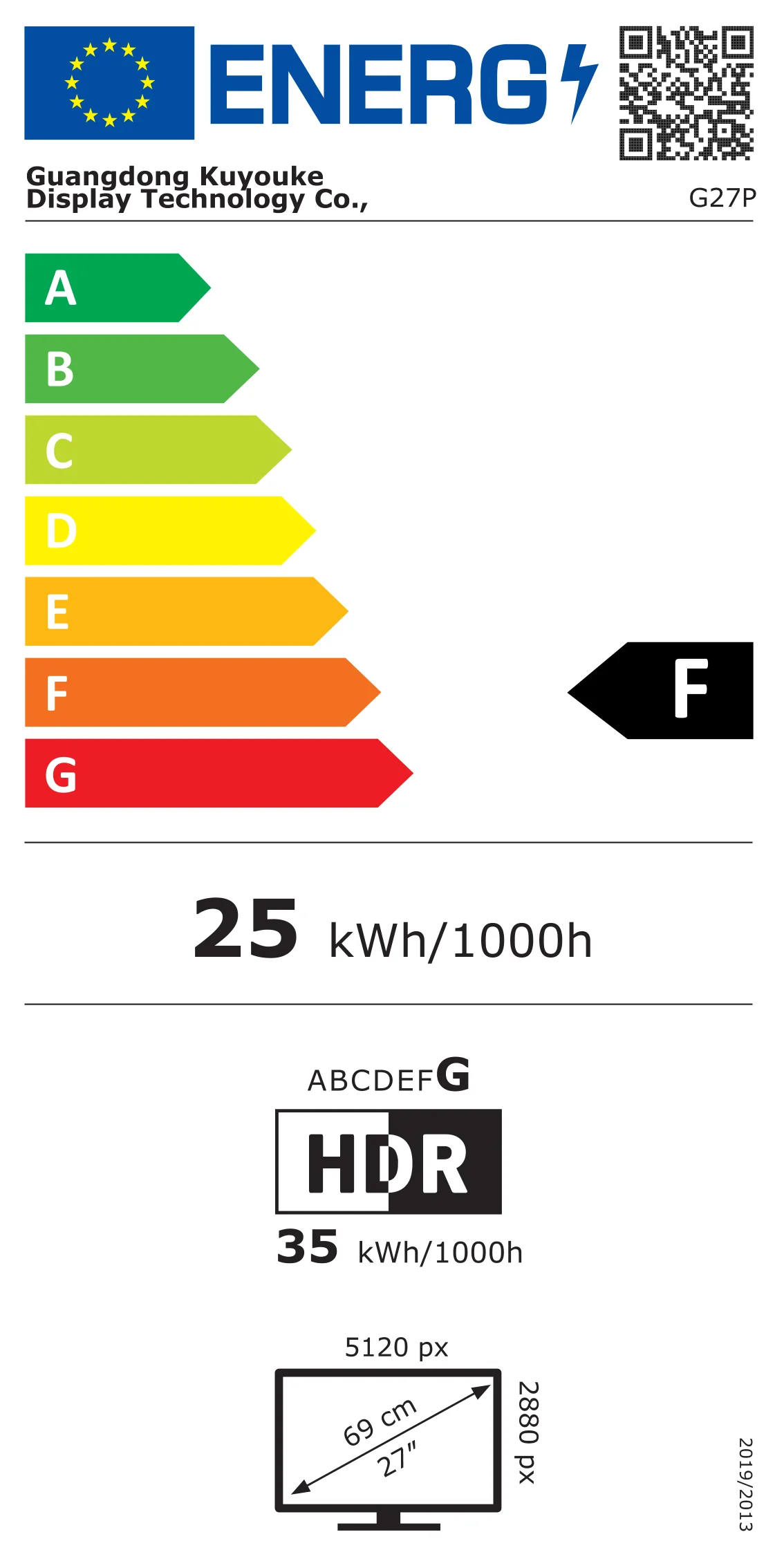
| Power consumption | 25.1 W in SDR, 34.6 W in HDR, 0.5 W in standby (EPREL) |
| Energy class | F in SDR, G in HDR. EPREL product sheet 2565734 |
Energy label
Dimensions and weight
| Monitor without stand | 618 × 360 × 22 mm (W × H × D) |
|---|---|
| Weight (monitor only) | 5.2 kg |
| Chassis | CNC-machined aluminum, sandblasted and anodized; plain or perforated back |
| Mounting | VESA 100 × 100 mm, adapter included; fixed or height-adjustable stand available as an option |
In the box
- Kuycon G27P monitor
- 100 × 100 VESA adapter
- Infrared remote, batteries not included (white remote: 1 CR2025 battery; black remote: 2 LR03 batteries, AAA size)
- Power cord, EU, UK, US, AU or CN plug, your choice
- 1 m USB-C cable
- DisplayPort cable
- 1.5 m HDMI cable
- 2 USB-C to USB-A adapters
- USB flash drive with documentation
Stand not included: available as an option at purchase.
Warranty and references
| Warranty | 2 years worldwide |
|---|---|
| Returns | 14 days after delivery |
| Model number | G27P |
| EAN | 3701655965757 |
Documents
You will also like
5/5
Reviews from customers who purchased the product
2 Comments
Frequently asked questions
Which Macs run the G27P in 5K, and at what refresh rate?
All Macs with M1 to M5 chips display it in 5K over a single USB-C cable, with 100 W charging. The G27P runs at 75 Hz on Macs with M4 and later, as well as on M2 Pro, M2 Max, M2 Ultra, M3 Pro, M3 Max and M3 Ultra; it stays at 60 Hz on M1 (all versions), M2 and M3. Apple guarantees a 5K display up to 120 Hz from M4 chips onward. The MacBook Neo is limited to one 4K display at 60 Hz.
Is my MacBook Pro with M5 Pro or M5 Max affected by the high refresh rate display bug?
Yes, it can be. Users of displays from several brands report that over USB-C or Thunderbolt, macOS sometimes brings displays set to a higher refresh rate back down to 60 Hz. Apple has not released any fix to date; macOS 27 Golden Gate should normally fix it. In the meantime, connect the G27P to the Mac's HDMI port with an Ultra High Speed HDMI cable. The base M5 is not affected.
What is the G27P's refresh rate?
75 Hz in 5K (5120 × 2880), over USB-C, DisplayPort 1.4 with DSC and HDMI 2.1, depending on the computer. Without DSC, a PC graphics card displays 5K at 60 Hz.
What does the IPS Black panel bring?
A 2000:1 contrast ratio, about twice that of a standard IPS panel: deeper blacks and more detailed shadows, with the wide viewing angle of IPS. Brightness reaches 600 nits across the entire screen.
What is the difference between the plain back and the perforated back?
Only the look changes: the plain back is solid aluminum, the perforated back has a honeycomb pattern. The G27P has no speakers, whichever back you choose; the panel, ports and refresh rate are identical. You choose the back when you buy.
Is one cable enough to connect a MacBook?
Yes. The included USB-C cable carries the 5K picture, up to 100 W of charging and the data for the monitor's two USB-C ports. For 100 W charging with another cable, choose a 5 A USB-C cable with an e-marker chip.
What ports does the G27P have?
One USB-C upstream port (video, data and 100 W charging), one DisplayPort 1.4 with DSC, two HDMI 2.1, two USB-C downstream ports at USB 2.0 speed and a 3.5 mm headphone jack, all on the back. The power supply is built in.
Is the stand included?
No. The monitor comes with a 100 × 100 VESA adapter for an arm or a wall mount. You can add the fixed stand or the height-adjustable stand, which also allows rotation to portrait mode, as an option when you buy; the VESA adapter is still included.
Is the screen glossy or matte?
Glossy, with anti-reflective glass bonded to the panel. Like any glossy screen, it reflects a window placed opposite it: it works best in a room without strong direct light.
Does the G27P support HDR?
It is HDR10 compatible over HDMI, DisplayPort and USB-C, with 600 nits full screen. It has no local dimming and no Mini-LED backlight. HDR turns on automatically and can be turned off in the monitor's menu.
How does it differ from the Kuycon P27Z?
Both monitors share 27-inch 5K, the aluminum chassis and the choice of back. The G27P focuses on the contrast of its IPS Black panel (2000:1) and a lower price, at 75 Hz; the P27Z goes up to 180 Hz in 5K and 330 Hz at 2560 × 1440, with DisplayPort 2.1.
Does the G27P have a camera or speakers?
No. For video calls, use your Mac's camera or an external camera; for sound, plug headphones or speakers into the monitor's 3.5 mm jack, or use your computer's speakers.
Can I connect a PC or a console?
Yes. A PC connects over DisplayPort 1.4, HDMI 2.1 or USB-C. A PS5 or an Xbox Series X|S displays in 4K at 60 Hz HDR over HDMI 2.1. Graphics cards compatible at 5K 75 Hz: NVIDIA GeForce GTX 1650 and newer, AMD Radeon RX 5500 and newer, Intel Iris Xe.
What warranty do I get, and will I pay taxes?
2-year warranty worldwide. Kuycon does not charge any taxes: at checkout, you choose DDP (import fees paid in advance, nothing to pay on arrival) or DAP (VAT and duties paid to the carrier on delivery), depending on the options available in your country.
How long does delivery take?
To an EU country, express delivery from our EU warehouse takes 48 to 96 h, subject to stock availability. Otherwise, the monitor ships from the factory: 5 to 10 business days by Air Express DAP, 10 to 20 business days by Air Express DDP, 30 to 40 business days by truck with DDP. You then have 14 days to change your mind.
Your review appreciation cannot be sent